
About
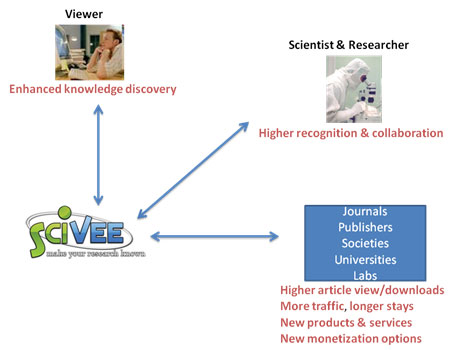
SciVee is changing the pace at which science is conducted and communicated. As the first Web 2.0 site that enables researchers to combine video with documentation and data in a media rich format, we enable scientists to make their research more visible, shareable, and accessible throughout the research cycle. Using our patent pending “virtual studio” technology, scientists can easily enhance their journal articles with “pubcasts” by linking and synchronizing video explanations to their published text. Similarly, video summaries can be associated and synchronized with scientific posters to create “postercasts” highlighting the key finding of the research. We also provide easy upload and hosting of videos on topics in all areas of scientific research.

We invite scientists to “make their research known” by creating and uploading pubcasts, postercasts and videos. You can add supplemental materials such as Powerpoint slide shows, additional diagrams and new commentary. You can create a research community around a topic of scientific interest, a pubcast, a postercast or a video. This community allows others to freely view your research and engage in virtual discussions with you and other community members about your research through commentary, email and blogging. You can also add your personal profile to enable others to learn about your areas of scientific interest and contact you for discussion and collaboration.
We encourage everyone interested in science to view SciVee pubcasts, postercasts and videos and to register for a membership. Once you become a member, you can upload videos, join communities, or you can create your own community around your specific scientific interests to initiate discussions, organize events, share your research and thoughts and collaborate with others.
About Pubcasts
A SciVee pubcast is the combination of a published scientific article and a video or audio presentation. You can make a video of yourself speaking about a paper you have published, or even just record your voice and then, using the SciVee ”virtual studio”, synchronize your presentation with the display of text and figures from your paper. It is kind of like giving a talk at a conference where the audience can see you and also see your visual aids - except the pubcast fits on a computer screen and the audience can view it anytime, anyplace.

It is easy to make a pubcast!
Have a friend or colleague record you giving your presentation, set up a webcam and film yourself, or contact a professional videographer. Then upload your video to SciVee. If you are presenting an Open Access paper, you can upload the full text of your paper with the video and select parts of the text of your paper to appear as your video plays.
We've found that pubcasts that are 10 minutes or less and cover the major highlights of the paper are very effective and make keeping up with the literature a lot more enjoyable. We think pubcasts will really help spread the word about your work. In fact, we have some statistics from existing pubcasts that show a marked increase in traffic to the original paper on the publisher's website. These data imply:
- Many more people access your paper than would be the case if it just appeared on the publishers Web site or a traditional archive.
- Over a 6 month period there could be up to a 75% increase in the number of viewings of your published article So give it a try - it's easy and can be a lot of fun!
Want to learn more about creating a pubcast? Check out the pubcast help sections below:
- What do I put into my video?
- How can I make a video?
- What publications can I upload?
- What technical tips can you give me about recording a video myself or with colleagues?
- How do I create a pubcast?
- I want to create a pubcast, but the paper is currently in press. Should I wait until the paper comes out before starting anything?
- How do I cite my pubcast?
About Postercasts
A SciVee Postercast is the combination of a scientific poster with a video or audio presentation. You can make a video of yourself speaking about a poster you have presented at a conference or symposium and then, using the SciVee ”virtual studio”, synchronize your video with the display of your poster; you can choose specific areas of the poster on which to zoom in that relate to that section of the video. It is kind of like presenting your poster at a conference where attendees ask you about your poster - except the postercast fits on a computer screen and the audience can view it anytime, anyplace. This gives the time and effort you put into making your poster a lot more value since your poster will be available to a broader audience and will be accessible after the conference is over.
It is easy to make a postercast!
Once you have finished making your poster, make a video of yourself presenting the information by having a friend record you or by setting up a webcam. You can do this at the conference or at any other time. Then upload your video and a high-resolution image of your poster to SciVee. You can then select areas of your poster to appear as your video plays to create a compelling record of your poster presentation.
We've found that SciVee postercasts that are 5 minutes or less covering the major highlights of the poster are very effective yet still help make your research understandable. SciVee postercasts will really help spread the word about your research so give it a try - it's easy and can be a lot of fun!
If you want to learn more about creating a postercast, check out the tutorial or the postercast help section.
About Communities
SciVee Communites are virtual “research networks” that are created to promote discussion and collaboration on a particular scientific topic. You can create a community around any scientific topic you are interested in and any SciVee member can apply to join any existing communities. Communities can be centered around pubcasts, postercasts, videos, events, conferences or anything else that is science-related. In the community, you can engage in on-line discussions through commentary, discussion groups and blogging. You can learn from others, collaborate and debate the issues on-line. You can also check out the personal profiles of the other community members to find potential collaborators and friends. Communities can be open, moderated, invitation-only or closed.
It is easy to make a community!
All you have to do to join a community on SciVee is register for an account and log in. Then navigate to the community that you would like to join by searching for a topic or community name or by browsing through the list of existing communities. When you find the community page, simply click "Join this community" and you will be subscribed.
Want to learn more about communities? Check out the community help sections below: